Getting Started with cURL

What is server?
It's a computer that's always connected to the internet and always waiting to respond to requests. So when you click on a web page, when you submit a form, or when you use an application to retrieve information, you're actually working with a Computer (the server) to get Information.
What is cURL?
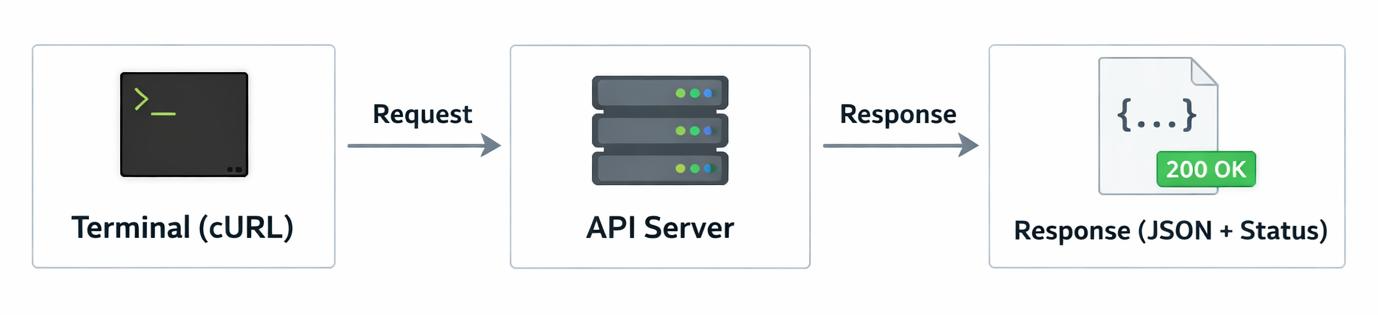
cURL which is client-URL is a command-line tool that allows users to interact with a web server. cURL can be thought of as WhatsApp. With cURL, you send a "message" to the server (request). The server sends you a "reply" (response). so instead of using your web browser to input messages, you can use the command line instead.
Programmers need cURL because their browsers hide too many details from them.
By using cURL you can:
Test an API without writing a lot of code.
Verify that a server is up and running.
Understand how client-to-server communications take place.
troubleshoot issues on your backend.
Open terminal and type:
curl https://jsonplaceholder.typicode.com/posts/1
You sent a GET request for post number 1 and Server replies with data.
Understanding Request and Response
Request:
has URL (where to send) Method (GET or POST)
Response:
tells success or failure and returns the data content
Using cURL to Talk to APIs
API are servers that send and receive data in JSON format. cURL sends a request and the server understands it, and sends back data in JSON.
GET vs POST
GET -> Used to get data
curl https://fake-json-api.mock.beeceptor.com/companies
I've put this link intended to get any 10 randoms companies
POST -> Used to send data
curl -X POST https://api.example.com/users \
-H "Content-Type: application/json"\
-d '{"name": "Tanu", "role": "Student"}'
this means telling the server to save this data.
command break down:
CurlThe tool we are using to talk to the server.
X POSTwe are using POST method.
api.example.com/usersThe address of the server where we send the data
-H "Content-Type: application/json"its a Header that tells the server: " sending data in JSON format.”
-d '{"name": "Tanu", "role": "Student"}'this is Data This is the actual information you are sending.
Where cURL fits in backend development
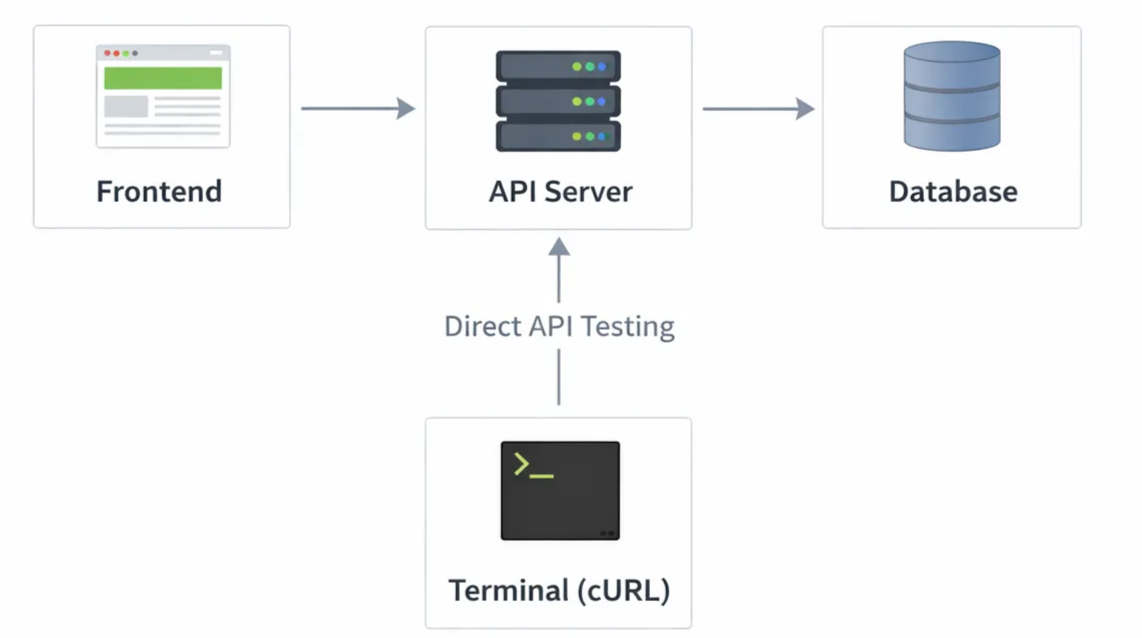
cURL is for working directly in the terminal, it is used when you want control and see how things work behind the scenes.
cURL fits into backend development as a tool to communicate directly with API. with this developers can send requests and receive responses from servers without any frontend, making it perfect for testing and understanding how backend systems give output.
It helps you to: Test APIs quickly Check if your server is working, Find bugs in your endpoints, Understand real backend communication.
Conclusion
A server is the computer that take requests, and cURL is the tool that helps us communicate to it clearly. cURL shows us how real communication happens between a client and a server without any hidden layers, making backend concepts easy to understand.
Thank you for reading this article…hope it helps.